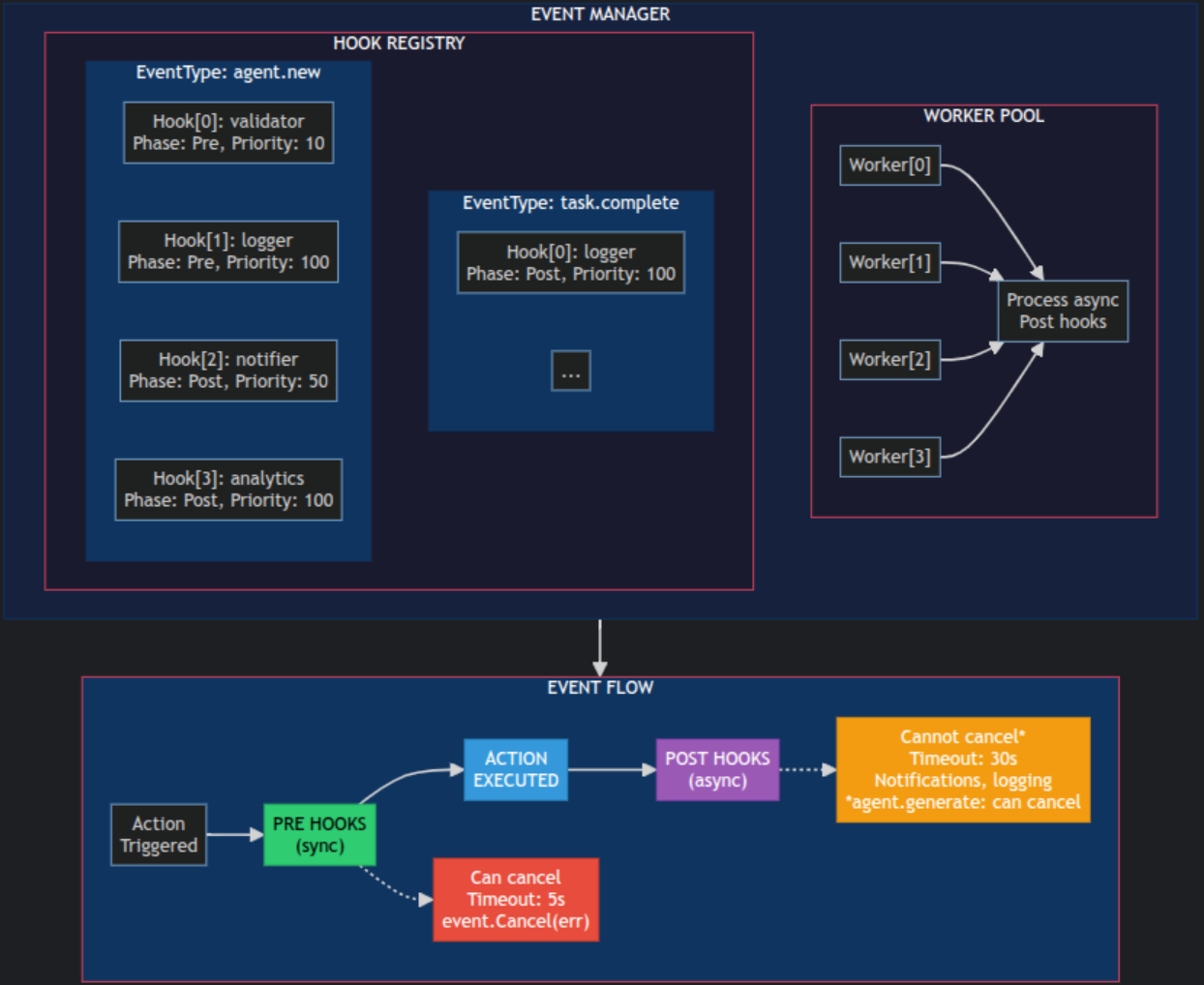
| Concept | Description |
|---|---|
| Event | Notification about an action in the system |
| Hook | Event handler function |
| Phase | Execution phase: Pre (before) or Post (after) |
| Priority | Execution priority (lower = earlier) |
| Timeout | Maximum hook execution time |
| Capability | Description |
|---|---|
| Modify data | Can modify event data before the action executes. Changes are passed to subsequent hooks and the action itself |
| Cancel event | Can completely cancel the event by returning an error. The action will not be executed |
| Validate | Can validate input data and reject invalid requests |
| Synchronous | Execute sequentially in priority order. Block the action until all Pre hooks complete |
| Timeout | 5 seconds maximum execution time per hook |
| Capability | Description |
|---|---|
| Read-only | Receive a copy of the event data. Modifications have no effect on the system |
| Cannot cancel | The action has already been executed. Returning an error only logs a warning (exception: agent.generate — Post hooks can cancel generation and modify FileName/FileContent) |
| Asynchronous | Execute in parallel via worker pool. Do not block the main flow |
| Timeout | 30 seconds maximum execution time per hook |
| Feature | Pre Hook | Post Hook |
|---|---|---|
| Execution time | Before action | After action |
| Can modify data | ✅ Yes | ❌ No (read-only copy) |
| Can cancel event | ✅ Yes (return error) | ❌ No |
| Execution mode | Synchronous | Asynchronous |
| Blocks main flow | ✅ Yes | ❌ No |
| Timeout | 5 seconds | 30 seconds |
| Error handling | Cancels event | Logs warning |
| Priority | Recommended usage |
|---|---|
| 1-10 | Critical validators |
| 10-50 | Data modifiers |
| 50-100 | Standard processing |
| 100+ | Logging, monitoring |
| Event Type | Description | Data |
|---|---|---|
client.connect | Client GUI connection | EventDataClientConnect |
client.disconnect | Client GUI disconnection | EventDataClientDisconnect |
| Event Type | Description | Data |
|---|---|---|
agent.new | New agent connected | EventDataAgentNew |
agent.generate | Agent payload generation | EventDataAgentGenerate |
agent.checkin | Agent check-in (heartbeat) | EventDataAgentCheckin |
agent.activate | Agent activated (from Inactive) | EventDataAgentActivate |
agent.update | Agent data update | EventDataAgentUpdate |
agent.terminate | Agent terminated | EventDataAgentTerminate |
agent.remove | Agent removed | EventDataAgentRemove |
| Event Type | Description | Data |
|---|---|---|
listener.start | Listener started (start/resume) | EventDataListenerStart |
listener.stop | Listener stopped (stop/pause) | EventDataListenerStop |