> For the complete documentation index, see [llms.txt](https://adaptix-framework.gitbook.io/adaptix-framework/llms.txt). Markdown versions of documentation pages are available by appending `.md` to page URLs; this page is available as [Markdown](https://adaptix-framework.gitbook.io/adaptix-framework/adaptix-c2/data-management/downloads-manager.md).
# Downloads Manager
The Downloads Tab displays all current or completed downloads.
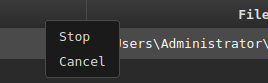
The context menu provides options to cancel the download, as well as stop and resume the download.
The downloaded files are stored on AdaptixServer. To copy a file from the server to the client system, select it and click "Sync file to client". Adaptix will then download the selected files to the folder on your system that you selected in the dialog box.